'%3e%3crect%20width='32'%20height='32'%20rx='5.35565'%20fill='%2332819B'/%3e%3cpath%20d='M25.8138%2031.9842H6.16257C2.76843%2031.9842%200.015625%2029.2327%200.015625%2025.8372V6.18601C0.015625%202.79187%202.76709%200.0390625%206.16257%200.0390625H25.8138C29.2079%200.0390625%2031.9607%202.79053%2031.9607%206.18601V25.8372C31.9607%2029.2314%2029.2093%2031.9842%2025.8138%2031.9842Z'%20fill='%2332819B'/%3e%3cpath%20d='M8.62811%2012.9461H15.7846L9.40735%2020.8135C8.63212%2021.7695%208.70844%2023.1834%209.57606%2023.9653C9.98978%2024.3389%2010.5227%2024.5437%2011.0756%2024.5437C11.7545%2024.5437%2012.3904%2024.2411%2012.8162%2023.7149L22.352%2011.9513C22.8835%2011.2952%2022.9839%2010.4477%2022.6211%209.68582C22.2582%208.92398%2021.5366%208.46875%2020.6917%208.46875H8.5625L8.62811%2012.9447V12.9461Z'%20fill='white'/%3e%3cpath%20d='M18.9639%2020.9375C17.7281%2020.9375%2016.57%2021.4235%2015.705%2022.3072C15.0905%2022.9352%2014.6781%2023.7064%2014.5%2024.5445H23.4279C23.2498%2023.7064%2022.8387%2022.9352%2022.2228%2022.3072C21.3566%2021.4235%2020.1997%2020.9375%2018.9626%2020.9375'%20fill='white'/%3e%3c/g%3e%3cdefs%3e%3cclipPath%20id='clip0_56_5821'%3e%3crect%20width='32'%20height='32'%20rx='5.35565'%20fill='white'/%3e%3c/clipPath%3e%3c/defs%3e%3c/svg%3e)


'%3e%3cpath%20d='M12.0365%2014.875V13.4583C12.0365%2012.7069%2011.7379%2011.9862%2011.2066%2011.4549C10.6752%2010.9235%209.95457%2010.625%209.20312%2010.625H3.53646C2.78501%2010.625%202.06434%2010.9235%201.53299%2011.4549C1.00164%2011.9862%200.703125%2012.7069%200.703125%2013.4583V14.875'%20stroke='%23111111'%20stroke-width='1.41667'%20stroke-linecap='round'%20stroke-linejoin='round'/%3e%3cpath%20d='M6.3724%207.79167C7.9372%207.79167%209.20573%206.52314%209.20573%204.95833C9.20573%203.39353%207.9372%202.125%206.3724%202.125C4.80759%202.125%203.53906%203.39353%203.53906%204.95833C3.53906%206.52314%204.80759%207.79167%206.3724%207.79167Z'%20stroke='%23111111'%20stroke-width='1.41667'%20stroke-linecap='round'%20stroke-linejoin='round'/%3e%3cpath%20d='M16.2865%2014.8747V13.458C16.286%2012.8303%2016.077%2012.2204%2015.6924%2011.7243C15.3078%2011.2281%2014.7693%2010.8737%2014.1615%2010.7168M11.3281%202.2168C11.9376%202.37284%2012.4778%202.72729%2012.8635%203.22427C13.2493%203.72124%2013.4587%204.33247%2013.4587%204.96159C13.4587%205.59071%2013.2493%206.20194%2012.8635%206.69891C12.4778%207.19588%2011.9376%207.55033%2011.3281%207.70638'%20stroke='%23111111'%20stroke-width='1.41667'%20stroke-linecap='round'%20stroke-linejoin='round'/%3e%3c/g%3e%3cdefs%3e%3cclipPath%20id='clip0_525_3636'%3e%3crect%20width='17'%20height='17'%20fill='white'/%3e%3c/clipPath%3e%3c/defs%3e%3c/svg%3e)
 Inventory
'%3e%3cpath%20d='M4%2014.6654V2.66536C4%202.31174%204.14048%201.9726%204.39052%201.72256C4.64057%201.47251%204.97971%201.33203%205.33333%201.33203H10.6667C11.0203%201.33203%2011.3594%201.47251%2011.6095%201.72256C11.8595%201.9726%2012%202.31174%2012%202.66536V14.6654H4Z'%20stroke='%230A0F1C'%20stroke-width='1.3'%20stroke-linecap='round'%20stroke-linejoin='round'/%3e%3cpath%20d='M4.0026%208H2.66927C2.31565%208%201.97651%208.14048%201.72646%208.39052C1.47641%208.64057%201.33594%208.97971%201.33594%209.33333V13.3333C1.33594%2013.687%201.47641%2014.0261%201.72646%2014.2761C1.97651%2014.5262%202.31565%2014.6667%202.66927%2014.6667H4.0026'%20stroke='%230A0F1C'%20stroke-width='1.3'%20stroke-linecap='round'%20stroke-linejoin='round'/%3e%3cpath%20d='M12%206H13.3333C13.687%206%2014.0261%206.14048%2014.2761%206.39052C14.5262%206.64057%2014.6667%206.97971%2014.6667%207.33333V13.3333C14.6667%2013.687%2014.5262%2014.0261%2014.2761%2014.2761C14.0261%2014.5262%2013.687%2014.6667%2013.3333%2014.6667H12'%20stroke='%230A0F1C'%20stroke-width='1.3'%20stroke-linecap='round'%20stroke-linejoin='round'/%3e%3cpath%20d='M6.66406%204H9.33073'%20stroke='%230A0F1C'%20stroke-width='1.3'%20stroke-linecap='round'%20stroke-linejoin='round'/%3e%3cpath%20d='M6.66406%206.66797H9.33073'%20stroke='%230A0F1C'%20stroke-width='1.3'%20stroke-linecap='round'%20stroke-linejoin='round'/%3e%3cpath%20d='M6.66406%209.33203H9.33073'%20stroke='%230A0F1C'%20stroke-width='1.3'%20stroke-linecap='round'%20stroke-linejoin='round'/%3e%3cpath%20d='M6.66406%2012H9.33073'%20stroke='%230A0F1C'%20stroke-width='1.3'%20stroke-linecap='round'%20stroke-linejoin='round'/%3e%3c/g%3e%3cdefs%3e%3cclipPath%20id='clip0_1625_4031'%3e%3crect%20width='16'%20height='16'%20fill='white'/%3e%3c/clipPath%3e%3c/defs%3e%3c/svg%3e) Assets
Assets Contracts
 Projects
 Fleet
Fleet Service Portal
 FieldFinance
 HR & Culture
 WhatsApp FSM
'%3e%3cpath%20d='M8.0026%2014.6654C11.6845%2014.6654%2014.6693%2011.6806%2014.6693%207.9987C14.6693%204.3168%2011.6845%201.33203%208.0026%201.33203C4.32071%201.33203%201.33594%204.3168%201.33594%207.9987C1.33594%2011.6806%204.32071%2014.6654%208.0026%2014.6654Z'%20stroke='%23111111'%20stroke-width='1.3'%20stroke-linecap='round'%20stroke-linejoin='round'/%3e%3cpath%20d='M8.0026%201.33203V3.9987M8.0026%2011.9987V14.6654M1.33594%207.9987H4.0026M12.0026%207.9987H14.6693'%20stroke='%23111111'%20stroke-width='1.3'%20stroke-linecap='round'%20stroke-linejoin='round'/%3e%3c/g%3e%3cdefs%3e%3cclipPath%20id='clip0_1625_4083'%3e%3crect%20width='16'%20height='16'%20fill='white'/%3e%3c/clipPath%3e%3c/defs%3e%3c/svg%3e) Employee/Technician Tracking
Employee/Technician Tracking GPS Attendance
 Work Order Management
 Quotations
 Invoicing
 Service Dispatch
'%3e%3cpath%20d='M8.0026%2014.6654C11.6845%2014.6654%2014.6693%2011.6806%2014.6693%207.9987C14.6693%204.3168%2011.6845%201.33203%208.0026%201.33203C4.32071%201.33203%201.33594%204.3168%201.33594%207.9987C1.33594%2011.6806%204.32071%2014.6654%208.0026%2014.6654Z'%20stroke='%23111111'%20stroke-width='1.3'%20stroke-linecap='round'%20stroke-linejoin='round'/%3e%3cpath%20d='M8%204V8L10.6667%209.33333'%20stroke='%23111111'%20stroke-width='1.3'%20stroke-linecap='round'%20stroke-linejoin='round'/%3e%3c/g%3e%3cdefs%3e%3cclipPath%20id='clip0_1625_4116'%3e%3crect%20width='16'%20height='16'%20fill='white'/%3e%3c/clipPath%3e%3c/defs%3e%3c/svg%3e) Overtime tracking software
Overtime tracking softwareWhat is a job card?
A job card is a one-page record of a single job: who the customer is, what was reported, what the technician did, the parts and labour used, and the customer's signature.
TEMPLATES · Job card
A job card is the record of one job, from the problem reported to the customer's sign-off. This free job card format covers the customer, site, equipment, work done, parts and labour, and both signatures, as a printable PDF or an editable Excel that adds up the totals for you.
PDF downloads straight away, no form. The Excel asks for your name, company, work email and team size.
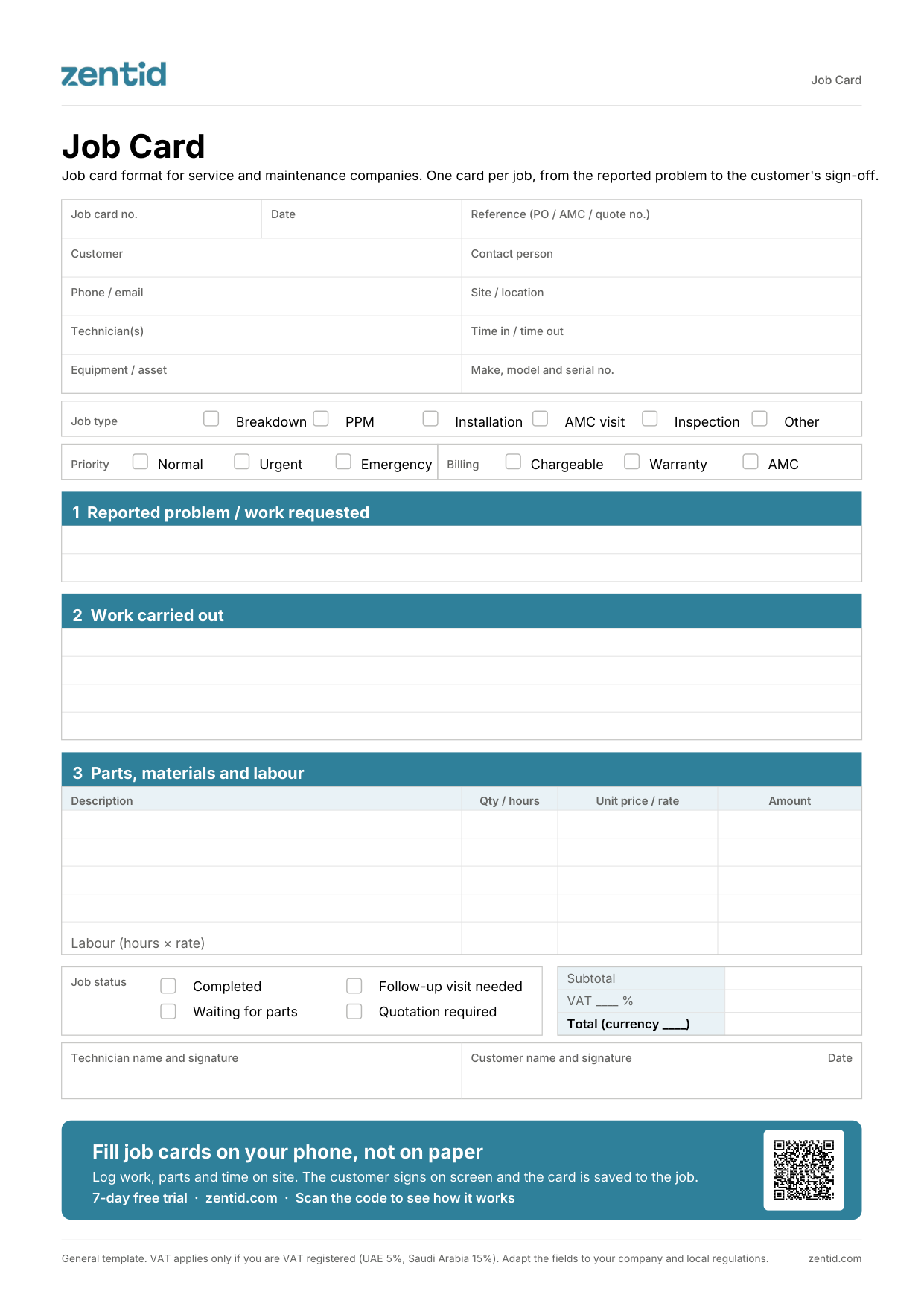
Service and maintenance companies whose technicians work at client sites: HVAC, lifts, fire and safety, kitchen and other equipment maintenance, cleaning and pest control, and facility management. Technicians fill it on site, supervisors check it, and the office uses it to bill the job.
Before the visit, the office fills in the header and the reported problem.
On site, the technician notes the time in and the work carried out.
The technician lists parts used and labour hours. In the Excel, set your currency and VAT rate once and the amounts calculate themselves.
The technician ticks the job status, so the office knows what happens next.
Technician and customer both sign. The customer keeps a copy and the office keeps one.
| Document | When | What it answers |
|---|---|---|
| Work order | Before the job | What to do, where, when and what to bring |
| Job card | During the job | What was done, the parts and labour used, and the charges |
| Service report | After the job | What was found, what is recommended and the equipment status, for the customer |
With Zentid, technicians fill the job card on their phone: on WhatsApp with nothing to install, or in the Zentid Field app, which works offline. They log the work, parts and time on site, add photos, and the customer signs on screen. The signed card is saved to the job, and the service report reaches the customer on WhatsApp, in English or Arabic.
A job card is a one-page record of a single job: who the customer is, what was reported, what the technician did, the parts and labour used, and the customer's signature.
No. A work order tells the technician what to do before the job. The job card records what was actually done during it.
Yes, in the Excel. Replace the logo box at the top and type your company details into the pale yellow cells. The PDF is a fixed printable form.
Yes. Enter your VAT rate once, for example 5% in the UAE or 15% in Saudi Arabia, or 0% if your company is not VAT registered. Subtotal, VAT and total calculate themselves.
Any. Choose your currency at the top of the Excel and the price headings follow it.
No for the PDF: it downloads straight away. The editable Excel asks for your name, company, work email and team size.
Zentid's free job card format is a one-page record of a single field service job, for service and maintenance companies. It covers the customer and site, equipment, job type and priority, the problem reported, work carried out, parts and labour with VAT and totals, job status, and technician and customer signatures. It comes as a printable PDF and an editable Excel with automatic totals, any currency and any VAT rate.
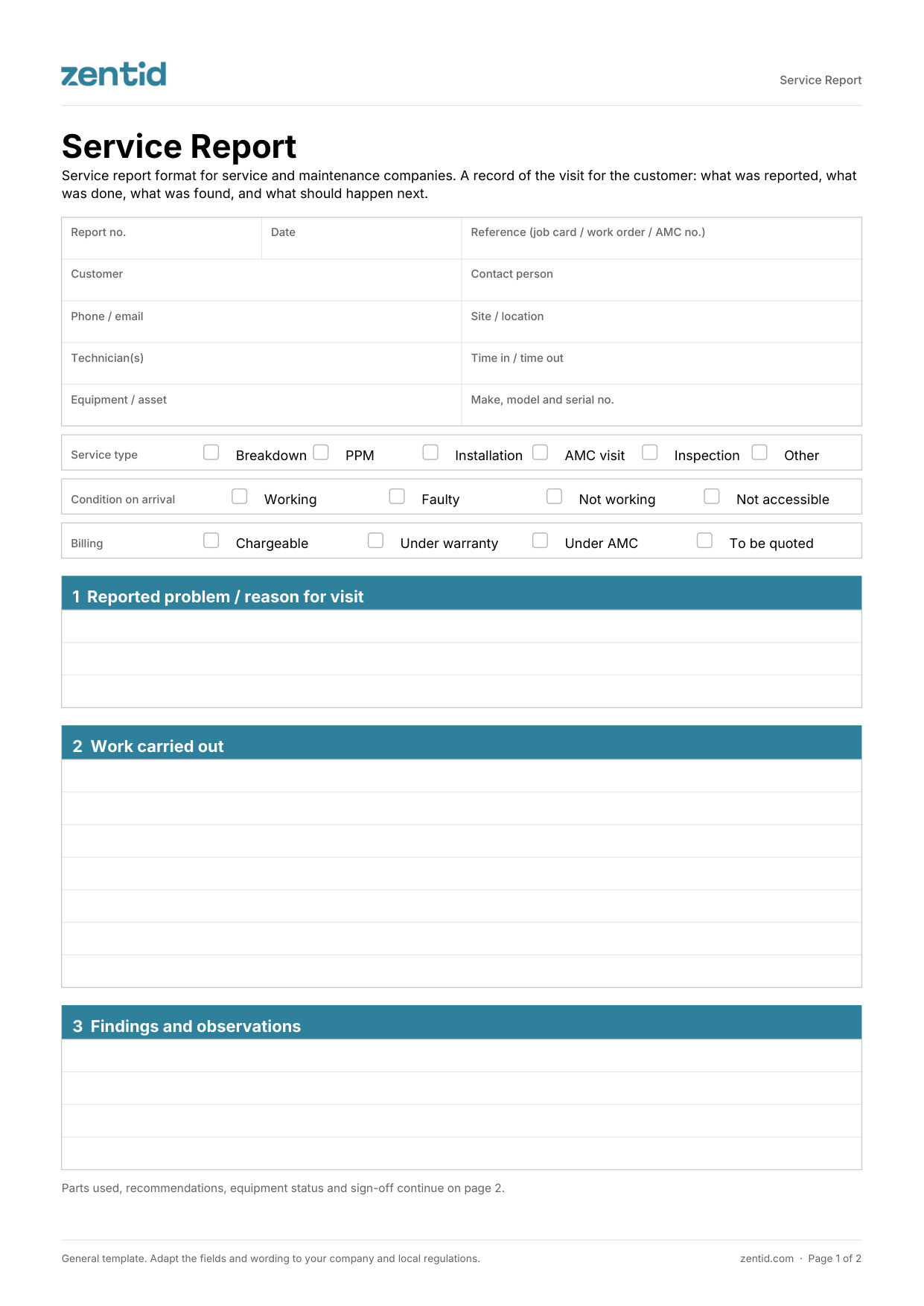
What the customer receives after a visit: work done, findings, recommendations and equipment status.
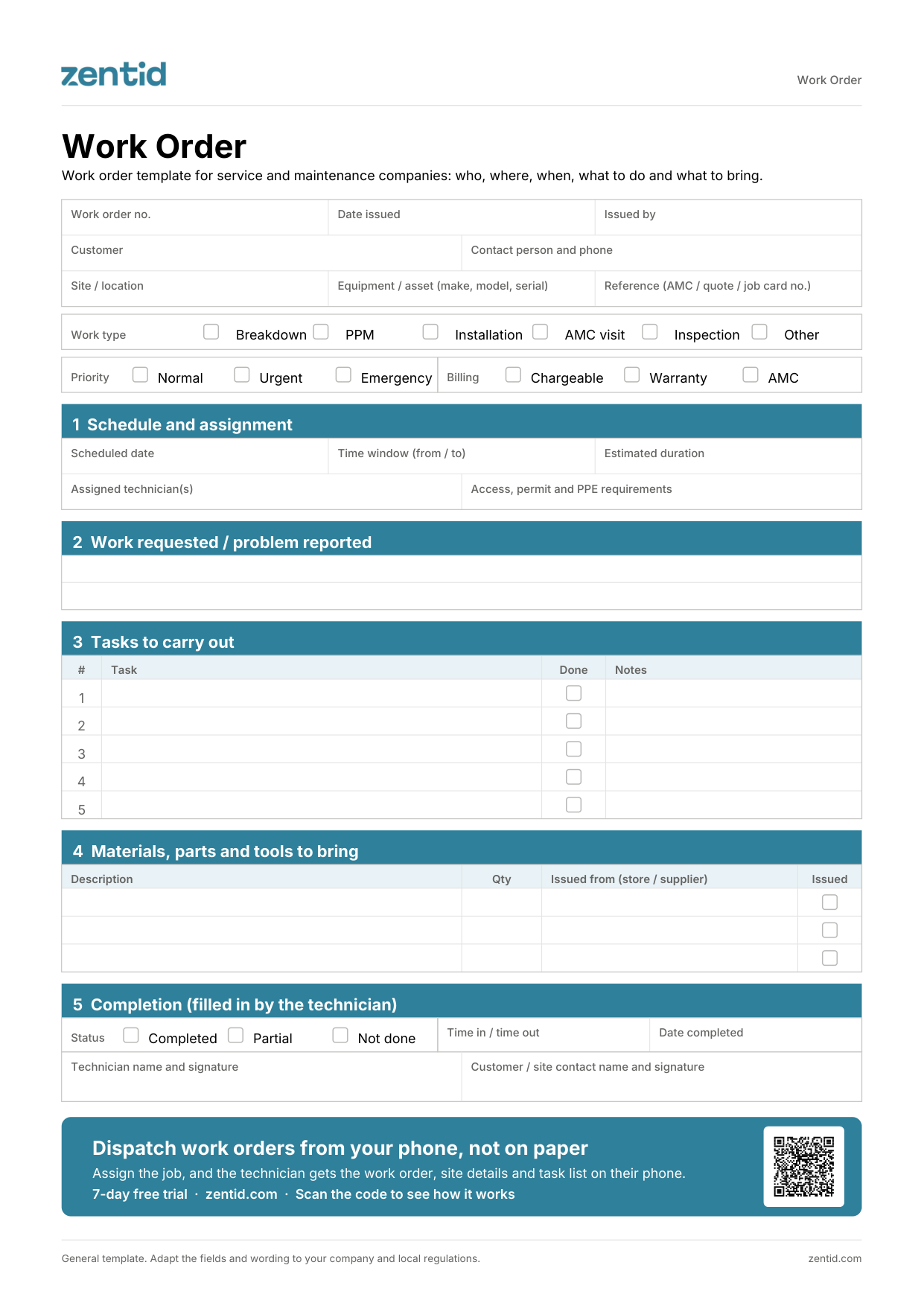
The technician's instruction before a job: site, schedule, tasks and materials to bring.
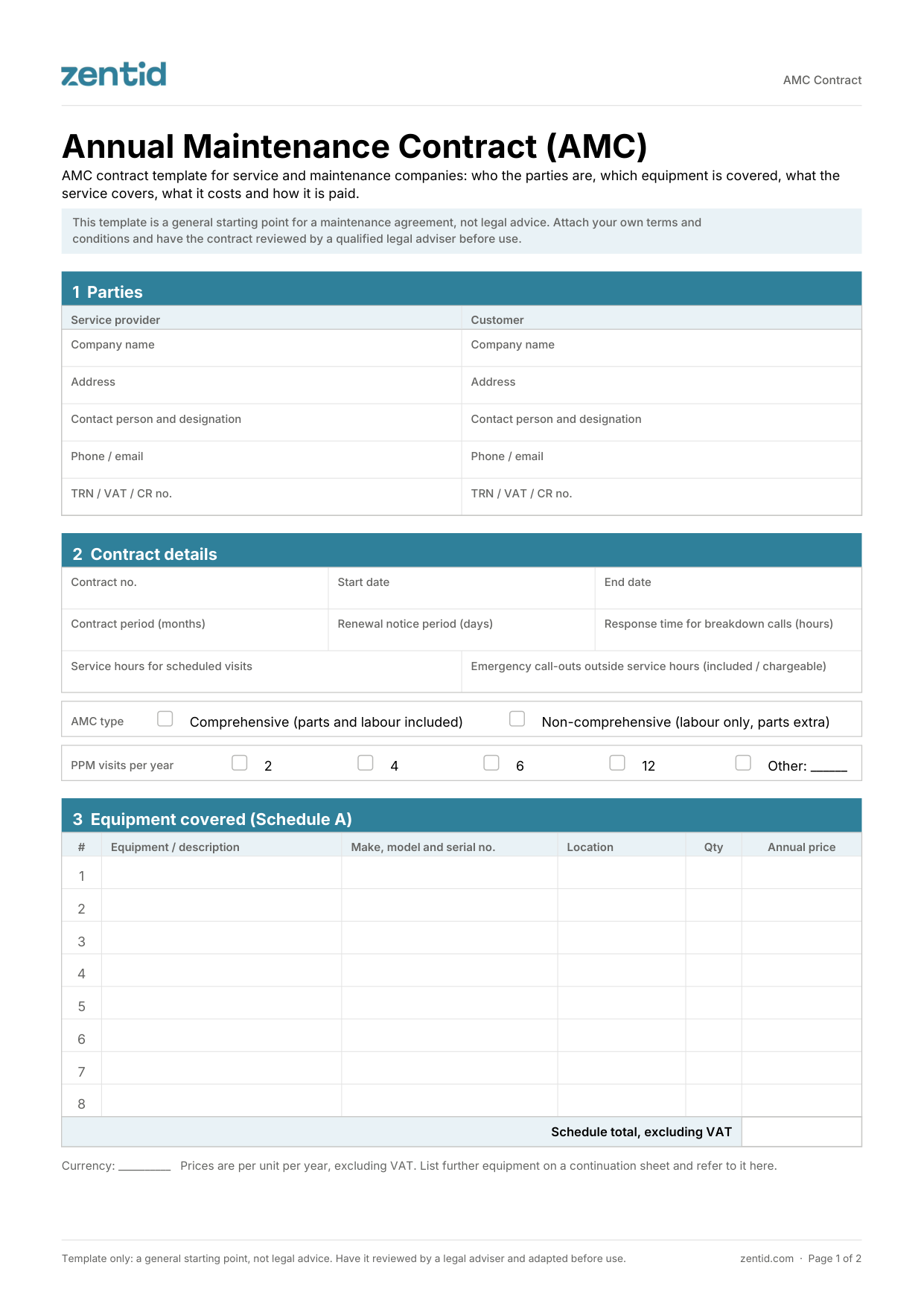
Annual maintenance contract with covered equipment, PPM visits, contract value and payment schedule.