'%3e%3crect%20width='32'%20height='32'%20rx='5.35565'%20fill='%2332819B'/%3e%3cpath%20d='M25.8138%2031.9842H6.16257C2.76843%2031.9842%200.015625%2029.2327%200.015625%2025.8372V6.18601C0.015625%202.79187%202.76709%200.0390625%206.16257%200.0390625H25.8138C29.2079%200.0390625%2031.9607%202.79053%2031.9607%206.18601V25.8372C31.9607%2029.2314%2029.2093%2031.9842%2025.8138%2031.9842Z'%20fill='%2332819B'/%3e%3cpath%20d='M8.62811%2012.9461H15.7846L9.40735%2020.8135C8.63212%2021.7695%208.70844%2023.1834%209.57606%2023.9653C9.98978%2024.3389%2010.5227%2024.5437%2011.0756%2024.5437C11.7545%2024.5437%2012.3904%2024.2411%2012.8162%2023.7149L22.352%2011.9513C22.8835%2011.2952%2022.9839%2010.4477%2022.6211%209.68582C22.2582%208.92398%2021.5366%208.46875%2020.6917%208.46875H8.5625L8.62811%2012.9447V12.9461Z'%20fill='white'/%3e%3cpath%20d='M18.9639%2020.9375C17.7281%2020.9375%2016.57%2021.4235%2015.705%2022.3072C15.0905%2022.9352%2014.6781%2023.7064%2014.5%2024.5445H23.4279C23.2498%2023.7064%2022.8387%2022.9352%2022.2228%2022.3072C21.3566%2021.4235%2020.1997%2020.9375%2018.9626%2020.9375'%20fill='white'/%3e%3c/g%3e%3cdefs%3e%3cclipPath%20id='clip0_56_5821'%3e%3crect%20width='32'%20height='32'%20rx='5.35565'%20fill='white'/%3e%3c/clipPath%3e%3c/defs%3e%3c/svg%3e)


'%3e%3cpath%20d='M12.0365%2014.875V13.4583C12.0365%2012.7069%2011.7379%2011.9862%2011.2066%2011.4549C10.6752%2010.9235%209.95457%2010.625%209.20312%2010.625H3.53646C2.78501%2010.625%202.06434%2010.9235%201.53299%2011.4549C1.00164%2011.9862%200.703125%2012.7069%200.703125%2013.4583V14.875'%20stroke='%23111111'%20stroke-width='1.41667'%20stroke-linecap='round'%20stroke-linejoin='round'/%3e%3cpath%20d='M6.3724%207.79167C7.9372%207.79167%209.20573%206.52314%209.20573%204.95833C9.20573%203.39353%207.9372%202.125%206.3724%202.125C4.80759%202.125%203.53906%203.39353%203.53906%204.95833C3.53906%206.52314%204.80759%207.79167%206.3724%207.79167Z'%20stroke='%23111111'%20stroke-width='1.41667'%20stroke-linecap='round'%20stroke-linejoin='round'/%3e%3cpath%20d='M16.2865%2014.8747V13.458C16.286%2012.8303%2016.077%2012.2204%2015.6924%2011.7243C15.3078%2011.2281%2014.7693%2010.8737%2014.1615%2010.7168M11.3281%202.2168C11.9376%202.37284%2012.4778%202.72729%2012.8635%203.22427C13.2493%203.72124%2013.4587%204.33247%2013.4587%204.96159C13.4587%205.59071%2013.2493%206.20194%2012.8635%206.69891C12.4778%207.19588%2011.9376%207.55033%2011.3281%207.70638'%20stroke='%23111111'%20stroke-width='1.41667'%20stroke-linecap='round'%20stroke-linejoin='round'/%3e%3c/g%3e%3cdefs%3e%3cclipPath%20id='clip0_525_3636'%3e%3crect%20width='17'%20height='17'%20fill='white'/%3e%3c/clipPath%3e%3c/defs%3e%3c/svg%3e)
 Inventory
'%3e%3cpath%20d='M4%2014.6654V2.66536C4%202.31174%204.14048%201.9726%204.39052%201.72256C4.64057%201.47251%204.97971%201.33203%205.33333%201.33203H10.6667C11.0203%201.33203%2011.3594%201.47251%2011.6095%201.72256C11.8595%201.9726%2012%202.31174%2012%202.66536V14.6654H4Z'%20stroke='%230A0F1C'%20stroke-width='1.3'%20stroke-linecap='round'%20stroke-linejoin='round'/%3e%3cpath%20d='M4.0026%208H2.66927C2.31565%208%201.97651%208.14048%201.72646%208.39052C1.47641%208.64057%201.33594%208.97971%201.33594%209.33333V13.3333C1.33594%2013.687%201.47641%2014.0261%201.72646%2014.2761C1.97651%2014.5262%202.31565%2014.6667%202.66927%2014.6667H4.0026'%20stroke='%230A0F1C'%20stroke-width='1.3'%20stroke-linecap='round'%20stroke-linejoin='round'/%3e%3cpath%20d='M12%206H13.3333C13.687%206%2014.0261%206.14048%2014.2761%206.39052C14.5262%206.64057%2014.6667%206.97971%2014.6667%207.33333V13.3333C14.6667%2013.687%2014.5262%2014.0261%2014.2761%2014.2761C14.0261%2014.5262%2013.687%2014.6667%2013.3333%2014.6667H12'%20stroke='%230A0F1C'%20stroke-width='1.3'%20stroke-linecap='round'%20stroke-linejoin='round'/%3e%3cpath%20d='M6.66406%204H9.33073'%20stroke='%230A0F1C'%20stroke-width='1.3'%20stroke-linecap='round'%20stroke-linejoin='round'/%3e%3cpath%20d='M6.66406%206.66797H9.33073'%20stroke='%230A0F1C'%20stroke-width='1.3'%20stroke-linecap='round'%20stroke-linejoin='round'/%3e%3cpath%20d='M6.66406%209.33203H9.33073'%20stroke='%230A0F1C'%20stroke-width='1.3'%20stroke-linecap='round'%20stroke-linejoin='round'/%3e%3cpath%20d='M6.66406%2012H9.33073'%20stroke='%230A0F1C'%20stroke-width='1.3'%20stroke-linecap='round'%20stroke-linejoin='round'/%3e%3c/g%3e%3cdefs%3e%3cclipPath%20id='clip0_1625_4031'%3e%3crect%20width='16'%20height='16'%20fill='white'/%3e%3c/clipPath%3e%3c/defs%3e%3c/svg%3e) Assets
Assets Contracts
 Projects
 Fleet
Fleet Service Portal
 FieldFinance
 HR & Culture
 WhatsApp FSM
'%3e%3cpath%20d='M8.0026%2014.6654C11.6845%2014.6654%2014.6693%2011.6806%2014.6693%207.9987C14.6693%204.3168%2011.6845%201.33203%208.0026%201.33203C4.32071%201.33203%201.33594%204.3168%201.33594%207.9987C1.33594%2011.6806%204.32071%2014.6654%208.0026%2014.6654Z'%20stroke='%23111111'%20stroke-width='1.3'%20stroke-linecap='round'%20stroke-linejoin='round'/%3e%3cpath%20d='M8.0026%201.33203V3.9987M8.0026%2011.9987V14.6654M1.33594%207.9987H4.0026M12.0026%207.9987H14.6693'%20stroke='%23111111'%20stroke-width='1.3'%20stroke-linecap='round'%20stroke-linejoin='round'/%3e%3c/g%3e%3cdefs%3e%3cclipPath%20id='clip0_1625_4083'%3e%3crect%20width='16'%20height='16'%20fill='white'/%3e%3c/clipPath%3e%3c/defs%3e%3c/svg%3e) Employee/Technician Tracking
Employee/Technician Tracking GPS Attendance
 Work Order Management
 Quotations
 Invoicing
 Service Dispatch
'%3e%3cpath%20d='M8.0026%2014.6654C11.6845%2014.6654%2014.6693%2011.6806%2014.6693%207.9987C14.6693%204.3168%2011.6845%201.33203%208.0026%201.33203C4.32071%201.33203%201.33594%204.3168%201.33594%207.9987C1.33594%2011.6806%204.32071%2014.6654%208.0026%2014.6654Z'%20stroke='%23111111'%20stroke-width='1.3'%20stroke-linecap='round'%20stroke-linejoin='round'/%3e%3cpath%20d='M8%204V8L10.6667%209.33333'%20stroke='%23111111'%20stroke-width='1.3'%20stroke-linecap='round'%20stroke-linejoin='round'/%3e%3c/g%3e%3cdefs%3e%3cclipPath%20id='clip0_1625_4116'%3e%3crect%20width='16'%20height='16'%20fill='white'/%3e%3c/clipPath%3e%3c/defs%3e%3c/svg%3e) Overtime tracking software
Overtime tracking softwareWhat is a work order?
A work order is the instruction for a single job, issued before the visit. It tells the technician where to go, when, what to do and what to bring.
TEMPLATES · Work order
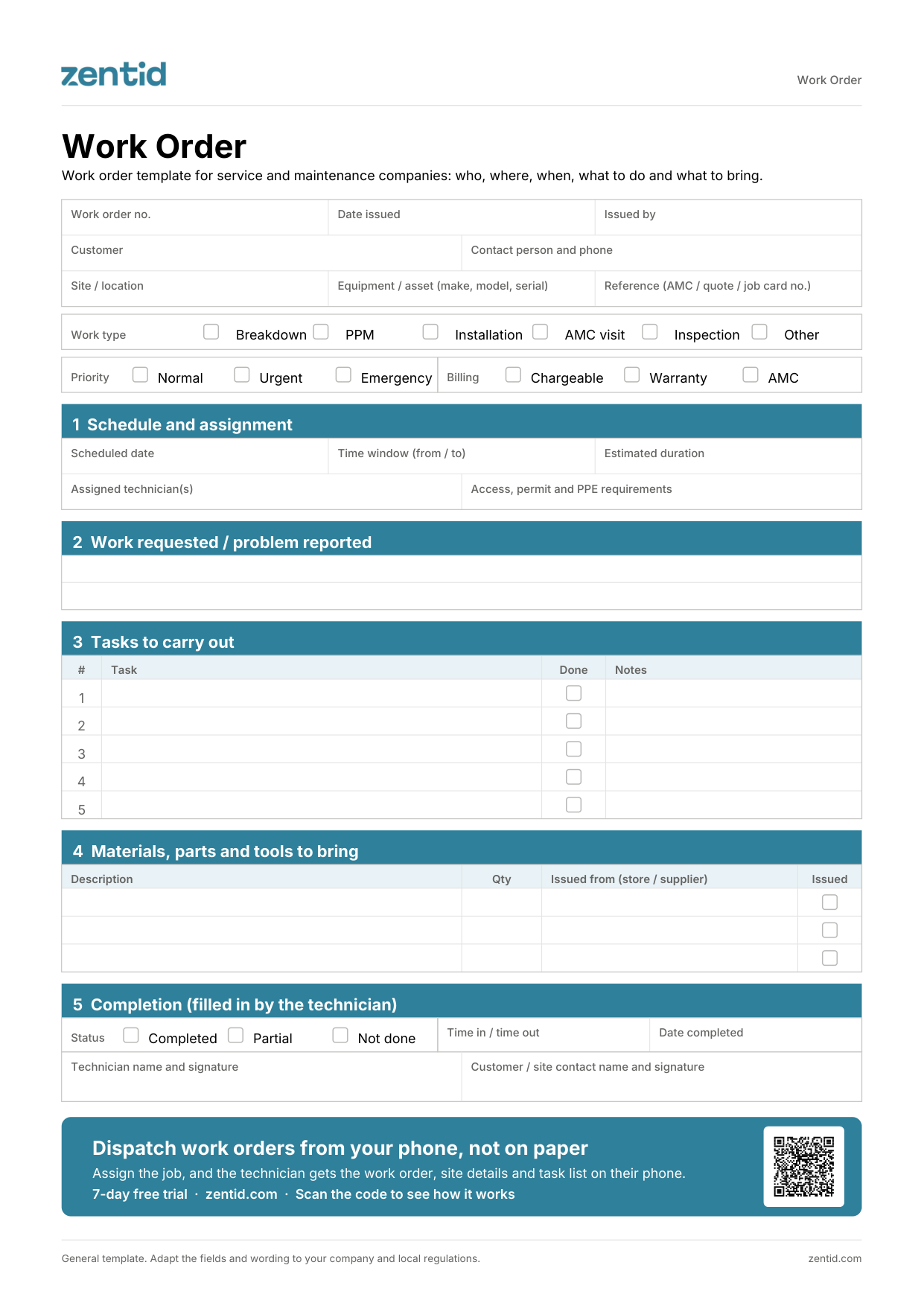
A work order is the instruction a technician receives before a job: who the customer is, where to go, when, what to do and what to bring. This free work order template covers the schedule, tasks, materials and the technician's sign-off, as a printable PDF or an editable Excel with drop-downs and a task counter.
PDF downloads straight away, no form. The Excel asks for your name, company, work email and team size.
Service coordinators and supervisors at service and maintenance companies who assign jobs to technicians: HVAC, lifts, fire and safety, equipment maintenance, cleaning and pest control, and facility management.
The service coordinator fills in the header: customer, site, equipment, work type, priority and billing.
Set the schedule: date, time window, estimated duration and the assigned technicians.
Note any access, permit or PPE requirements for the site.
Describe the work requested and break it into tasks.
List the materials, parts and tools to bring, and tick each one as the store issues it.
The technician ticks each task, records the status and time, and both technician and customer sign.
| Document | When | What it answers |
|---|---|---|
| Work order | Before the job | What to do, where, when and what to bring |
| Job card | During the job | What was done, the parts and labour used, and the charges |
| Service report | After the job | What was found, what is recommended and the equipment status, for the customer |
With Zentid, the Service dispatch agent suggests the right technician for each work order by location, skills, availability and SLA, and your service coordinator confirms. The technician gets the work order, site details and task list on WhatsApp or in the Zentid Field app, and closes it with photos and the customer's signature.
A work order is the instruction for a single job, issued before the visit. It tells the technician where to go, when, what to do and what to bring.
The work order is issued before the job and says what to do. The job card is filled during the job and records what was done, with parts, labour and charges.
Yes. Job order and work order are two names for the same document: the instruction a technician receives before a job.
The service coordinator or supervisor fills in sections 1 to 4 before the visit. The technician completes section 5 on site.
Many sites need a gate pass, a work permit or specific safety equipment. Noting them on the work order stops a technician arriving and being turned away.
Yes. Mark each task as done and the Excel shows how many tasks are complete, for example 3 of 5 tasks done.
No for the PDF: it downloads straight away. The editable Excel asks for your name, company, work email and team size.
Zentid's free work order template is a one-page job instruction for service and maintenance companies. It covers the customer, site and equipment, work type, priority and billing, the schedule and assigned technicians, access, permit and PPE requirements, the work requested, a task list, materials and tools to bring, and the technician's completion record with both signatures. It comes as a printable PDF and an editable Excel with drop-downs and a task counter.
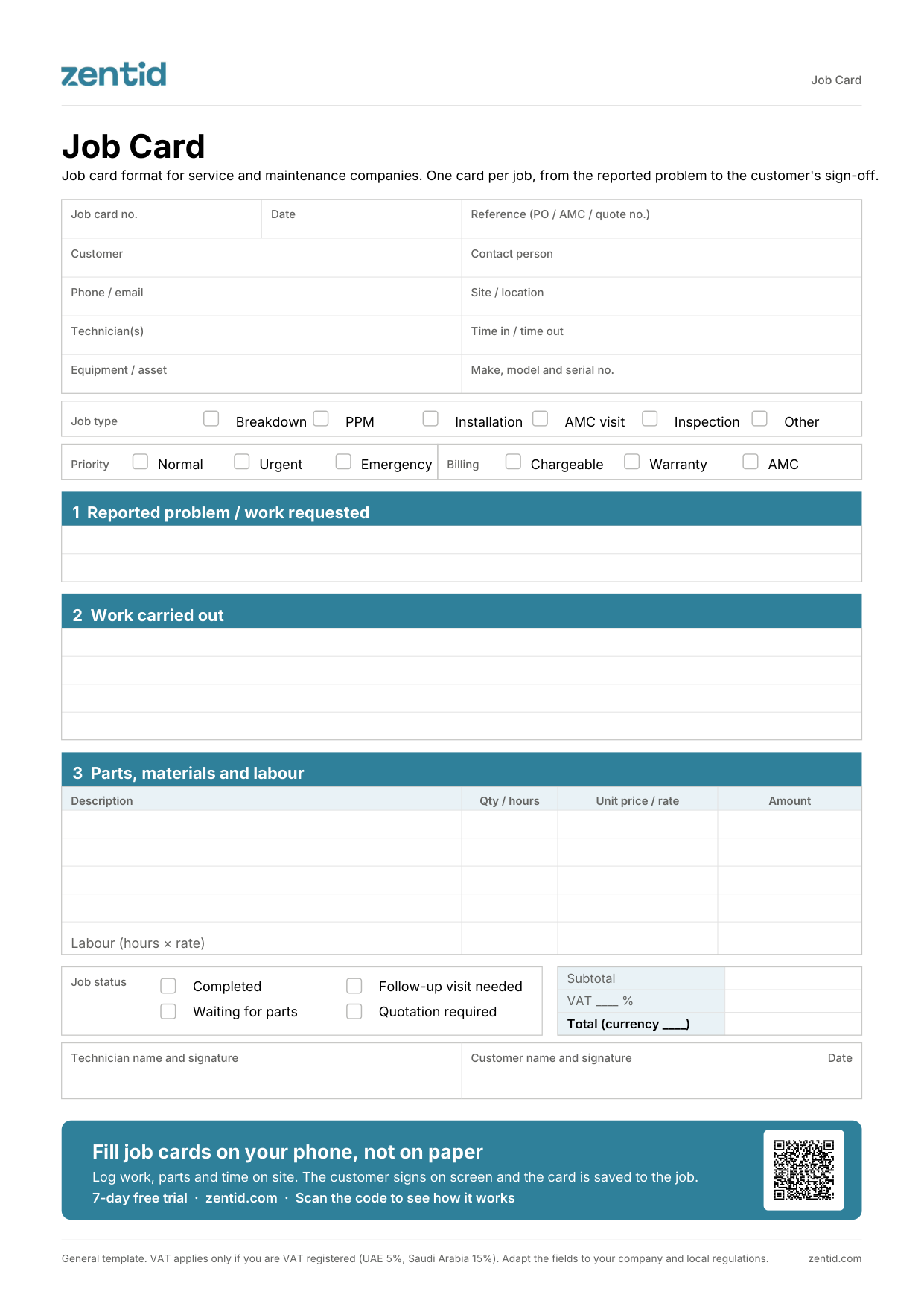
One page per job, from the reported problem to the customer's sign-off, with parts, labour and totals.
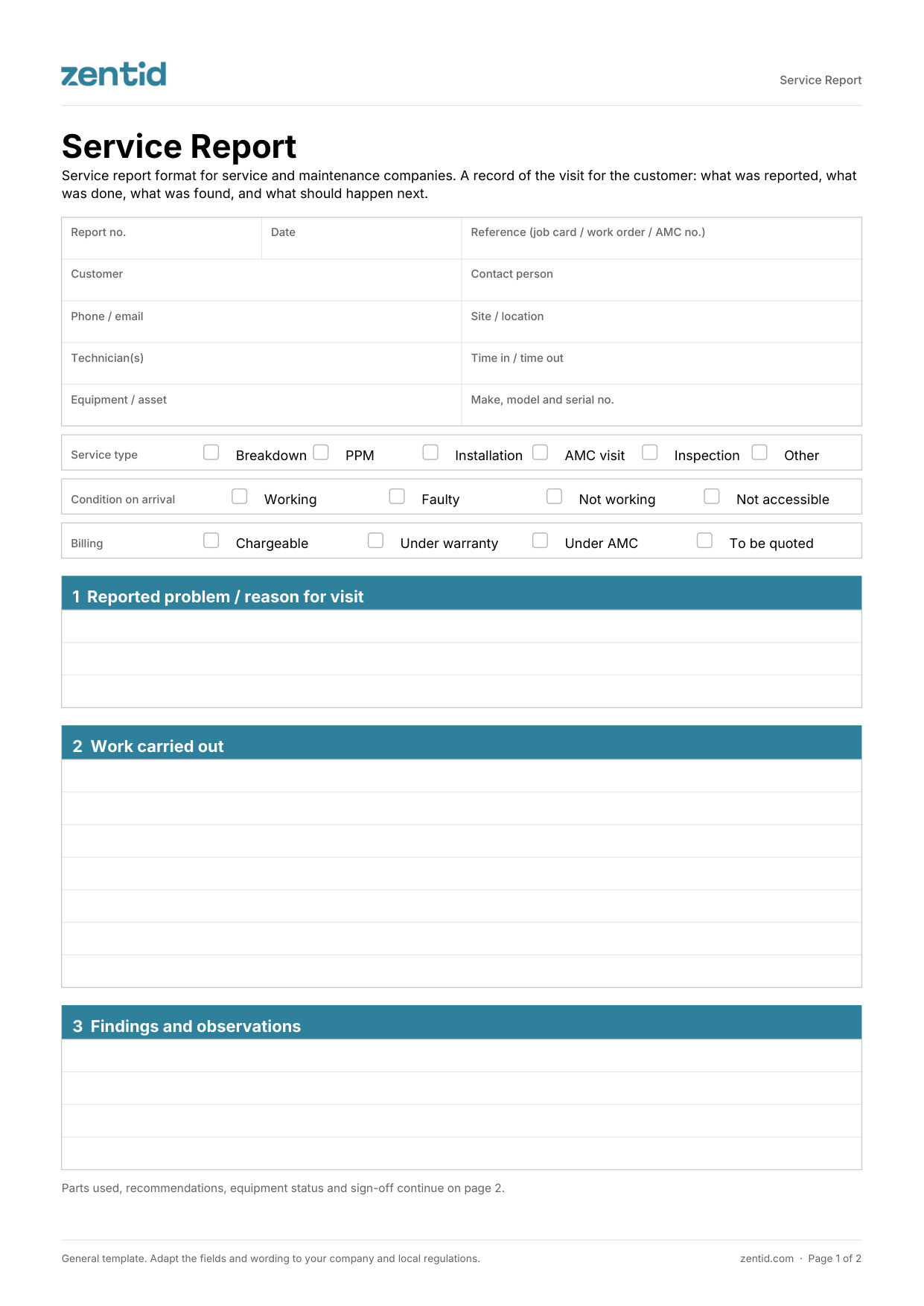
What the customer receives after a visit: work done, findings, recommendations and equipment status.
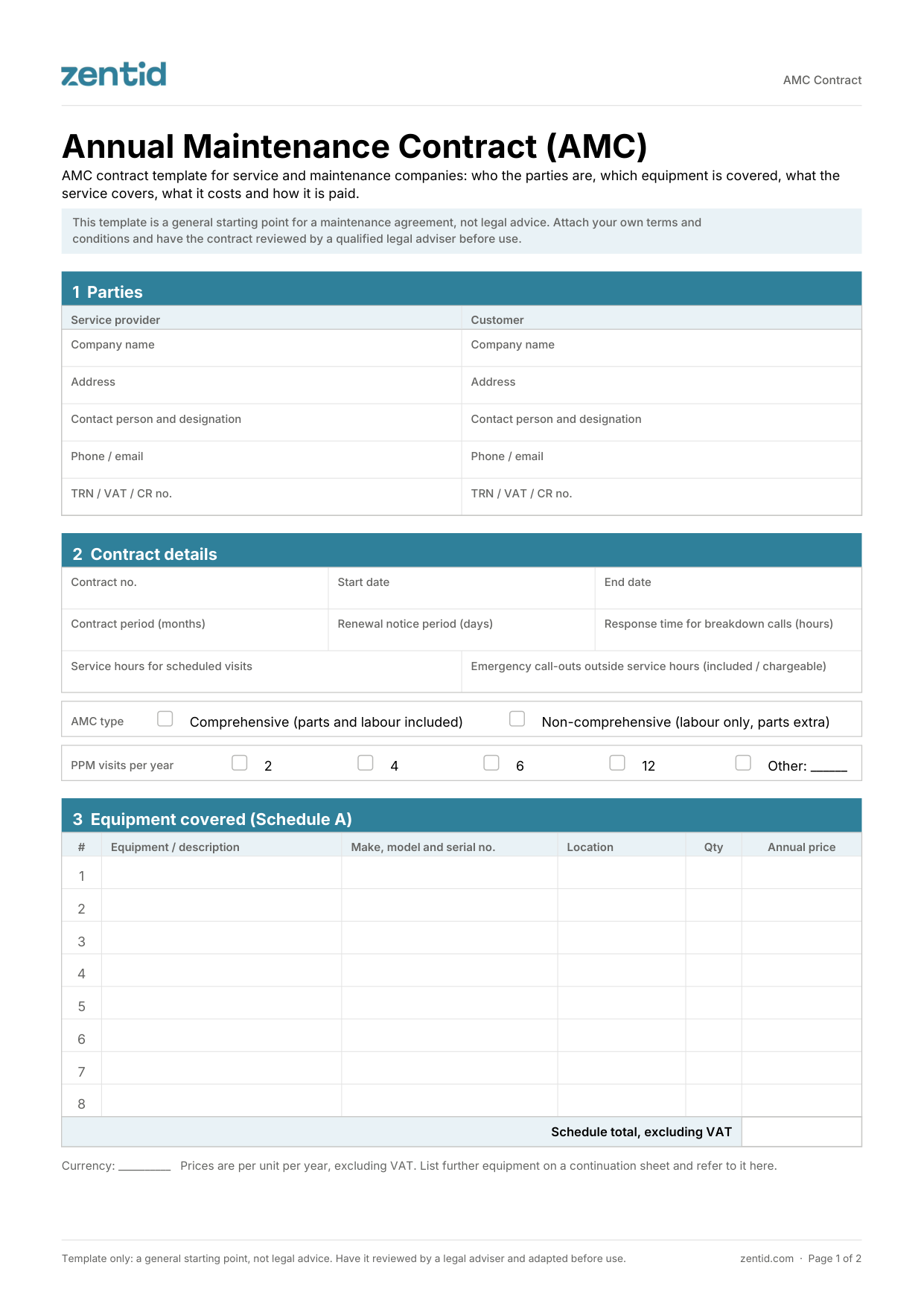
Annual maintenance contract with covered equipment, PPM visits, contract value and payment schedule.