'%3e%3crect%20width='32'%20height='32'%20rx='5.35565'%20fill='%2332819B'/%3e%3cpath%20d='M25.8138%2031.9842H6.16257C2.76843%2031.9842%200.015625%2029.2327%200.015625%2025.8372V6.18601C0.015625%202.79187%202.76709%200.0390625%206.16257%200.0390625H25.8138C29.2079%200.0390625%2031.9607%202.79053%2031.9607%206.18601V25.8372C31.9607%2029.2314%2029.2093%2031.9842%2025.8138%2031.9842Z'%20fill='%2332819B'/%3e%3cpath%20d='M8.62811%2012.9461H15.7846L9.40735%2020.8135C8.63212%2021.7695%208.70844%2023.1834%209.57606%2023.9653C9.98978%2024.3389%2010.5227%2024.5437%2011.0756%2024.5437C11.7545%2024.5437%2012.3904%2024.2411%2012.8162%2023.7149L22.352%2011.9513C22.8835%2011.2952%2022.9839%2010.4477%2022.6211%209.68582C22.2582%208.92398%2021.5366%208.46875%2020.6917%208.46875H8.5625L8.62811%2012.9447V12.9461Z'%20fill='white'/%3e%3cpath%20d='M18.9639%2020.9375C17.7281%2020.9375%2016.57%2021.4235%2015.705%2022.3072C15.0905%2022.9352%2014.6781%2023.7064%2014.5%2024.5445H23.4279C23.2498%2023.7064%2022.8387%2022.9352%2022.2228%2022.3072C21.3566%2021.4235%2020.1997%2020.9375%2018.9626%2020.9375'%20fill='white'/%3e%3c/g%3e%3cdefs%3e%3cclipPath%20id='clip0_56_5821'%3e%3crect%20width='32'%20height='32'%20rx='5.35565'%20fill='white'/%3e%3c/clipPath%3e%3c/defs%3e%3c/svg%3e)

Another app nobody opens
Technicians push back on installing and learning one more app, and every new hire means another round of setup.
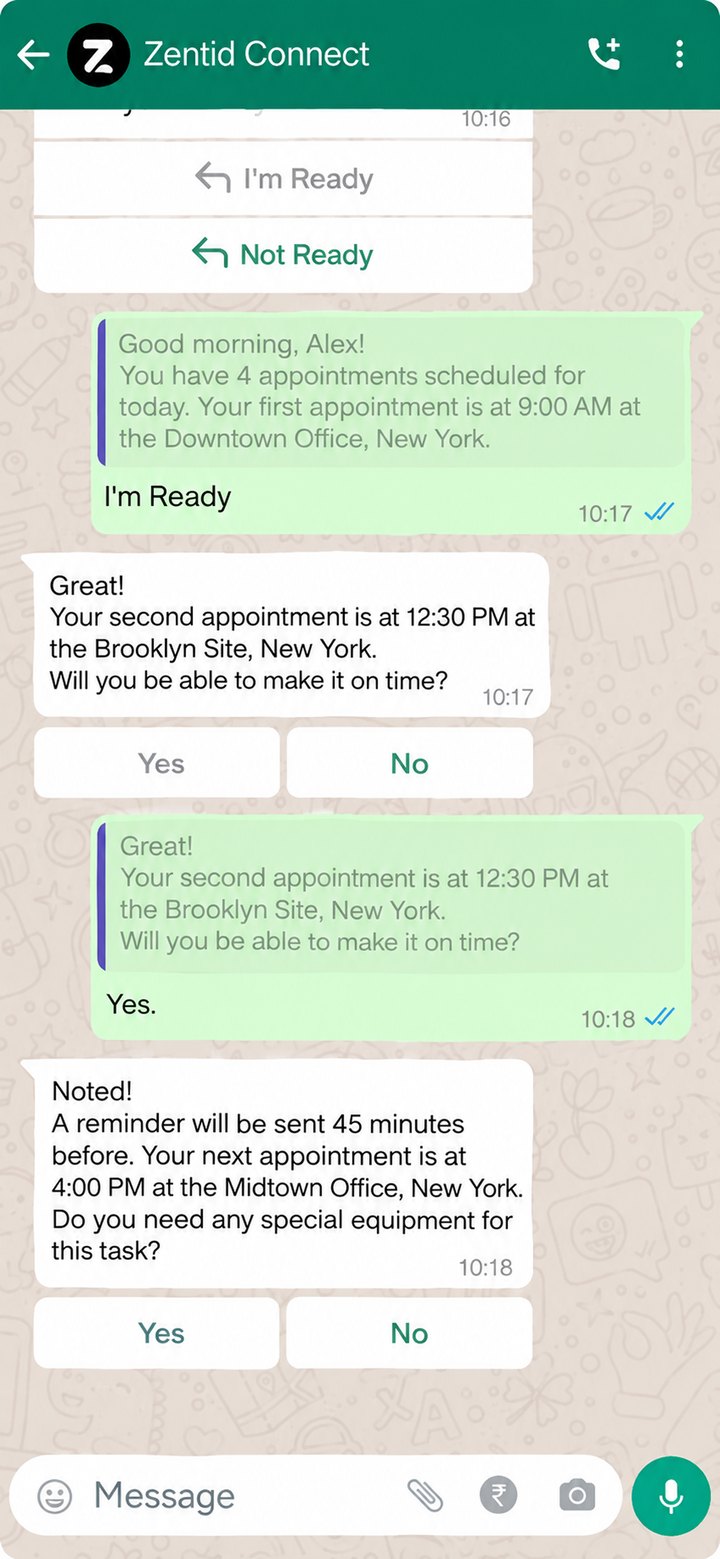
Your technicians receive work orders, check in, fill checklists, send before and after photos and get the client's sign-off in WhatsApp, with no app to install. Every update lands on the job record in Zentid Manage, so the service coordinator sees it without a phone call.
Sites with no signal? The Zentid Field app does the same jobs and works offline.
Field technician
Technicians use the WhatsApp already on their phone.
WhatsApp, or the Zentid Field app where signal drops.
Every update lands on the work order in Zentid Manage.
The problem
Most service teams already run the field on WhatsApp groups and phone calls. None of it reaches the job record, so service coordinators spend the day chasing updates.
Technicians push back on installing and learning one more app, and every new hire means another round of setup.
Service coordinators phone technicians to ask where they are, whether the job is done and which spare parts were used.
Arrival and departure times are not recorded, so attendance and timesheets get pieced together later.
Photos, notes and sign-offs sit in a busy WhatsApp group instead of on the work order.
Paper job sheets arrive days later, the service coordinator retypes them, and the invoice waits for the report.
In the chat
Every action below is saved against the work order in Zentid Manage.
All of today's PPM visits and call-outs arrive in one message with I'm Ready and Not Ready buttons.
A reminder 30 minutes before each job (you can change the timing), and one-tap questions like whether special equipment is needed.
The site, the scope of work and what the technician needs to bring.
Attendance and timesheets are recorded in Zentid Manage.
The technician works through the checklist step by step in the chat.
Before and after photos and notes sent in the chat attach to the work order.
Photograph the spare part barcode and send it with a quantity.
A signature link goes to the client, who signs on their own phone.
The technician marks the work order complete from the same chat.
How it works
The work order is created in Zentid Manage, or comes from an AMC contract as a scheduled PPM visit. The Scheduling agent can propose a technician, and the service coordinator approves.
The job arrives in the morning schedule, with a reminder 30 minutes before the visit.
One reply records the arrival time against the job.
Checklist, before and after photos, notes and spare parts used, all sent in the same chat.
The client signs through a link, and the technician checks out.
The service report is ready in English or Arabic. The Post service agent drafts the report and the invoice for a manager to approve.
Mobile and offline
Check two things: what the technician has to install, and what happens when there is no signal. With Zentid, technicians run jobs in WhatsApp with nothing to install. WhatsApp needs signal, so for basements, plant rooms and remote sites the Zentid Field app works offline and syncs when the connection returns. Same jobs, same data, same system.
For PPM visits, call-outs, subcontractors and new crews.
For sites where signal drops, and technicians who prefer an app.


Connected
Technicians work in WhatsApp. The service coordinator plans, assigns and reviews in Zentid Manage, including PPM visits from AMC contracts. Both look at the same job record, so nobody chases updates across groups and calls.
Zentid connects to Zoho, Odoo, ERPNext, QuickBooks, Stripe, Twilio, Wati, Calendly and Tidio, and can integrate with other business software that offers a REST API.
AI agents that work alongside the chat. A person approves each step.
A client message on WhatsApp or email becomes a service request. The receptionist approves it.
The agent proposes a technician for the job. The service coordinator approves or changes it.
After the visit, the agent drafts the report and the invoice for a manager to approve.
Compared
| What you need | WhatsApp groups, calls and paper | Zentid WhatsApp FSM |
|---|---|---|
| Job details reach the technician | As loose messages | As a work order |
| Arrival and departure times | Asked for by phone | Recorded in Zentid Manage |
| Checklists | On paper, if at all | Filled in the chat, saved to the job |
| Before and after photos and notes | Scattered across chats | Attached to the work order |
| Client sign-off | Paper job sheet | Signature link |
| Job status for the service coordinator | Call the technician | Open the job record |
| New app for technicians | None | None |
FAQ
It lets technicians receive work orders, check in and out, fill checklists, send before and after photos and collect client sign-off through WhatsApp. With Zentid, every one of those actions is saved to the job record in Zentid Manage, where service coordinators plan and review jobs.
No. Technicians can complete work orders in WhatsApp with nothing to install. The Zentid Field app is optional, for technicians who prefer an app or work where signal drops.
Receive the day's schedule and confirm they are ready, get a reminder 30 minutes before each job (the timing can be changed), answer quick checks like whether special equipment is needed, view work order details, check in and out, complete checklists, send before and after photos and notes, log spare parts by photographing the barcode, send the client a signature link and close the job.
Yes. PPM visits created from AMC contracts in Zentid Manage go to the assigned technician on WhatsApp, like any other work order.
Yes. Updates sent in WhatsApp are recorded against the work order in Zentid Manage, so the service coordinator can see progress, attendance and completion without calling the technician.
WhatsApp needs signal. For basements, plant rooms and remote sites, technicians use the Zentid Field app, which works offline and syncs when the connection returns.
The technician sends the client a signature link from the chat. The client signs on their own phone, and the signature is saved to the work order.
Yes. Service reports can be issued in English and Arabic. The app interface is in English.
Zentid connects to Zoho, Odoo, ERPNext, QuickBooks, Stripe, Twilio, Wati, Calendly and Tidio, and can integrate with other business software that offers a REST API.